
Android 17 Features: Everything You Need to Know
Want to learn what’s new with Android 17? We’ve gathered together everything you need to know about.
The latest update brings new features and improvements to the Android family of smartphones, from easier multitasking and improved gaming to extra privacy and security tools, along with smaller changes designed to make everyday use that much easier.
New Android 17 features
Bubbles
If you like having a few apps open at the same time, Bubbles lets you turn supported apps into floating windows and keep them together in one place. Add more apps as you go, then move between them without constantly switching back and forth.
Even better, Android remembers the apps you’ve used, so they’re ready to jump back into whenever you need them. It builds on Android 16’s move towards more desktop-like multitasking, giving you another way to keep multiple apps within easy reach.
Screen Reactions
Want to add your reaction to a screen recording? Screen Reactions lets you record what’s happening on your screen while your front-facing camera captures your reaction at the same time.
Whether you’re reacting to a game, video or the latest TikTok trend, your reaction can be part of the recording, too.
Android Handoff
Moving between your Android devices gets easier with Handoff. With supported apps, you can start watching a video or browse a webpage on your phone and continue it on another nearby Android device without having to start over.
It’s handy when you’re moving from your phone to a tablet and want to carry on from where you left off.
Hide app names
Want a cleaner-looking home screen? Android 17 lets you hide the names underneath app icons, leaving you with a cleaner layout. You can still find everything where you expect it but without text sitting underneath every icon. It’s a small change but if you prefer a more minimalist home screen, it makes a noticeable difference.
Split Quick Settings
Android 17 makes it easier to manage your Wi-Fi and mobile data with separate controls in Quick Settings. Instead of having both connection options grouped together, you can switch each one on or off individually, without having to dig through your phone’s settings.
Expanded Dark Theme
If you prefer your phone in dark mode, Android 17 makes it easier with the latest update. Expanded Dark Theme gives apps a darker look, even when they don’t have their own dark mode, so you’re less likely to be met with a bright screen when switching between apps.
You can also choose which apps use the setting. If one app looks a little strange in dark mode, you can leave it out while keeping the setting on for the rest.
Dedicated Assistant volume
Android 17 gives Assistant its own volume control, separate from your usual media volume.
You can turn Assistant responses up or down without changing the volume of whatever you’re watching or listening to. It’s another small update with the new release, but one that gives you more control when using Assistant alongside other audio sources.
Custom vibration patterns
You can give your calls and notifications their own vibration patterns in Android 17, making it easier to tell who’s calling without reaching for your phone. Personalise your alerts and stay in the know, even when your phone’s on silent.
Share selected contacts
Not every app needs access to your full address book. Android 17 lets you choose which contacts to share, so you can give an app the details it needs without handing over your entire contact list. It’s a useful privacy upgrade that gives you more control when sharing your personal information.
Stronger theft protection
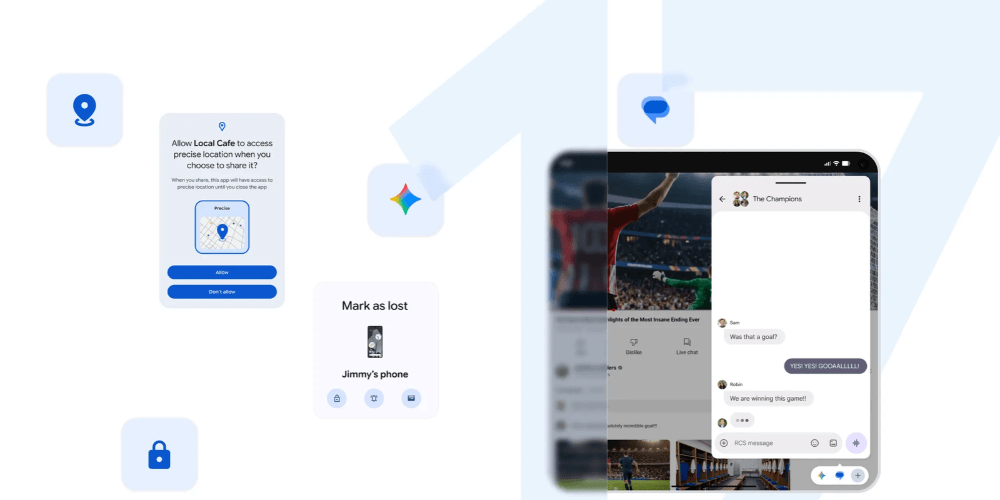
Android 17 adds extra protection if your phone is lost or stolen. With the Mark as Lost feature, your phone can be locked so it can’t be unlocked without your fingerprint or facial recognition. Your Google Wallet details are also automatically removed, while personal data and settings are disabled.
These extra safety features make it harder for someone else to access your phone if it falls into the wrong hands.
Better protection from scams and malicious apps
Android 17 adds more protection against scams and potentially harmful apps. Improvements to Live Threat Detection and Advanced Protection can help spot suspicious activity before it becomes a bigger problem.
Expanded parental controls
If you’re a parent, Android 17 gives you more ways to manage how your children use their devices. You can set limits around screen time, apps and content, giving you more control over what they can access and how long they can spend on their phones and tablets.
More control over your location
You can choose to share your precise location for a limited amount of time, rather than giving an app ongoing access to where you are.
Once the time is up, apps no longer have access to your precise location, giving you more control over what you share, and when.
Pause Point
Pause Point gives you a mindful moment to think before opening apps you’ve chosen to spend less time on. You can set it to show a breathing exercise, a favourite photo or set a timer before the app opens, giving you a chance to decide whether you really want to use it.
It’s a handy option if you open apps out of habit. Rather than going straight into another scroll, Pause Point adds a short break that can help you be a little more intentional about how you spend your time.
Rambler
Rambler takes voice typing a step further. Instead of simply transcribing everything you say, it turns your natural speech into cleaner, more polished text. It can remove filler words, tidy up grammar and punctuation, and even let you edit or rewrite what you’ve said using voice commands.
Rambler is available on Pixel 11-series devices, with support on other Android phones expected to follow.
Improved gaming controls
Android 17 brings some worthwhile changes for gamers, especially if you have a foldable phone.
Foldable Gaming Mode is designed to make better use of a foldable’s larger screen, with an optimised 50/50 layout that puts the game on one half and a dynamic virtual gamepad on the other.
Android 17 also makes physical controllers more customisable, with native controller remapping that lets you change how the buttons work.
Create My Widget
Create My Widget lets you make a custom widget simply by describing what you want to see. You could ask for the weather, your next alarm or even ask the time, and Gemini can create a widget based on your request.
This tool will be available as part of Google’s feature rollouts.
Which phones support Android 17?
One of the things to keep in mind with Android 17 is that not every feature will appear on every phone at the same time. The update started rolling out to Pixel phones first, with other eligible Android devices following throughout 2026 and beyond:
• Pixel 11 series
• Pixel 10 series
• Pixel 9 series
• Pixel 8 series
• Pixel 7 series
• Pixel 6
• Pixel Fold
• Galaxy S26 series
• Galaxy S25 series
• Galaxy S24 series
• Galaxy S23 series
• Galaxy FE
• Galaxy Z Fold series (Z Fold5 to Z Fold8)
• Galaxy Z Flip series (Z Flip5 to Z Flip8)
• Motorola Edge 70 series
• Motorola Edge 60 series
• Motorola Razr series
• HONOR Magic 8 series
• HONOR Magic 7 series
• HONOR Magic 6 series
• HONOR Magic 5 series