
How to Get Water & Liquids Out of a Charging Port
The presence of liquids in a phone’s charging port could spell disaster if not dealt with. In this guide, we’ll show you how to remove water and other liquids from the port, and what you’ll need to complete the task.
Want to change up your current handset? Take a look at our contract, SIM-only and refurbished phone collections.
What damage can water cause to a charging port?
Water can cause various types of damage to a phone’s internal parts. If liquid finds its way onto electronic components, this can result in short circuiting and parts failure. Corrosion can also occur, wherein metal components react to the moisture, gradually degrade, and become more prone to breaking.
There’s another problem that water creates in charging ports: it typically doesn’t stay in the same place. Water and liquids can gradually seep further into a device and damage other parts such as the motherboard or processor, hence the need to remove any water in the port as soon as possible.
How do I know if water is in the charging port?
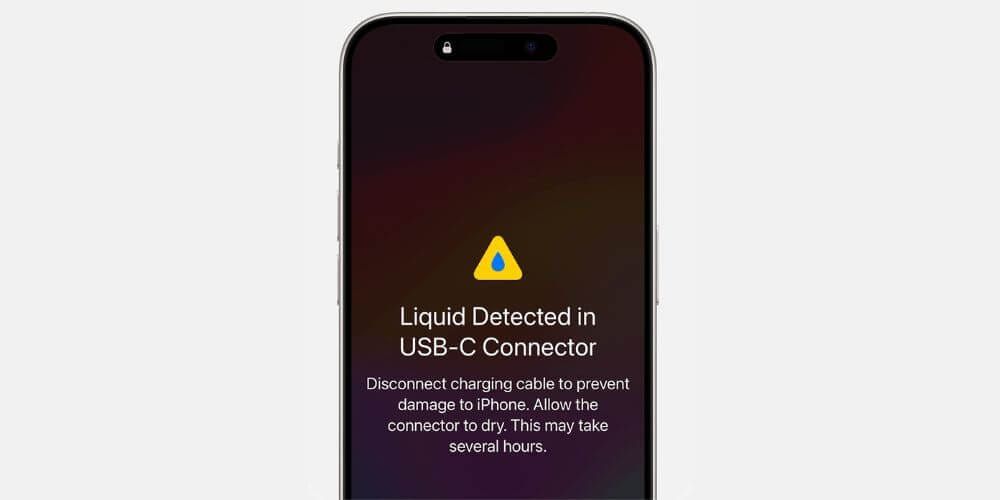
Most phones will display a warning if liquid is detected in the charging port. On an iPhone, this is typically a ‘Liquid Detected in Lightning/USB-C Connector’ warning, whereas on an Android you’ll usually see a water droplet icon and a ‘Moisture Detected’ message.
The exact warning can depend on the manufacturer, but they’ll generally follow the same messaging.
Removing water from a charging port: step-by-step
Gravity and dry conditions are your best friends when clearing water from a charging port. Crucially, they are non-invasive and don’t create the risk of other materials getting stuck.
- Start by unplugging the charger and powering off your phone
- Gently wipe down the exterior of the phone, making sure to not push any moisture into the port and other gaps
- Hold the phone in a vertical position, so the port is facing down and water can trickle out. Do this for a few minutes
- While still holding the phone vertically, tap it against your palm to further encourage the release of any water droplets. Don’t tap too hard, as this can damage the device and force liquid into other internal areas
- Let your phone air-dry and wait at least 30 minutes before plugging in the charging cable again. It’s also worth checking the cable to see if it has any moisture, too
What not to do when removing water from a charging port
• Don’t use rice – you might have heard or read that rice can help dry devices, but it comes with great risk. Rice can carry dust that plays havoc with phone interiors if not cleared out
• Avoid metallic and fluffy objects – it can be tempting to use something like a cotton bud to dry up water inside the charging port, but you run the risk of fluff getting stuck inside or damaging parts inside the port itself
• Don’t use an air dryer – anything that blows air can ultimately push water droplets further inside the port, causing further damage
How do I protect my phone’s charging port?
Consider buying a phone case if you don’t have one already. Whether the case is specifically waterproof or not, shielding your device in one can help prevent moisture build-up. We also have a guide on some of the top handsets that offer exceptional waterproof credentials.
It’s worth building up your knowledge of IP ratings, too. This grade is a key part of any phone’s specifications, and dictates how effective a device is against water ingress and submersion.
Conclusion
Water in a charging port can seem like an immediate cause for panic, but with these steps, it’s possible to remedy the problem before damage is done.
There are many phones on the market that aren’t just waterproof, but also boast excellent durability. Take a look at our guide on the leading rugged smartphones you can buy.
FAQs
Can water permanently damage a charging port?
Yes, if water in a charging port isn’t dealt with, it can gradually corrode parts and even cause a short-circuit.
How long do charging ports take to dry?
You should wait at least 30 minutes before attempting to charge your phone again after drying it. It can take 1-2 hours for a charging port to thoroughly dry, and ~24 hours if the device was fully submerged in water.
Can a fan dry out a wet phone port?
It can, but it’s not always recommended to do so. A fan can push water droplets and moisture further into the port, increasing the risk of corrosion and short circuiting of internal parts.